
Quick Answer
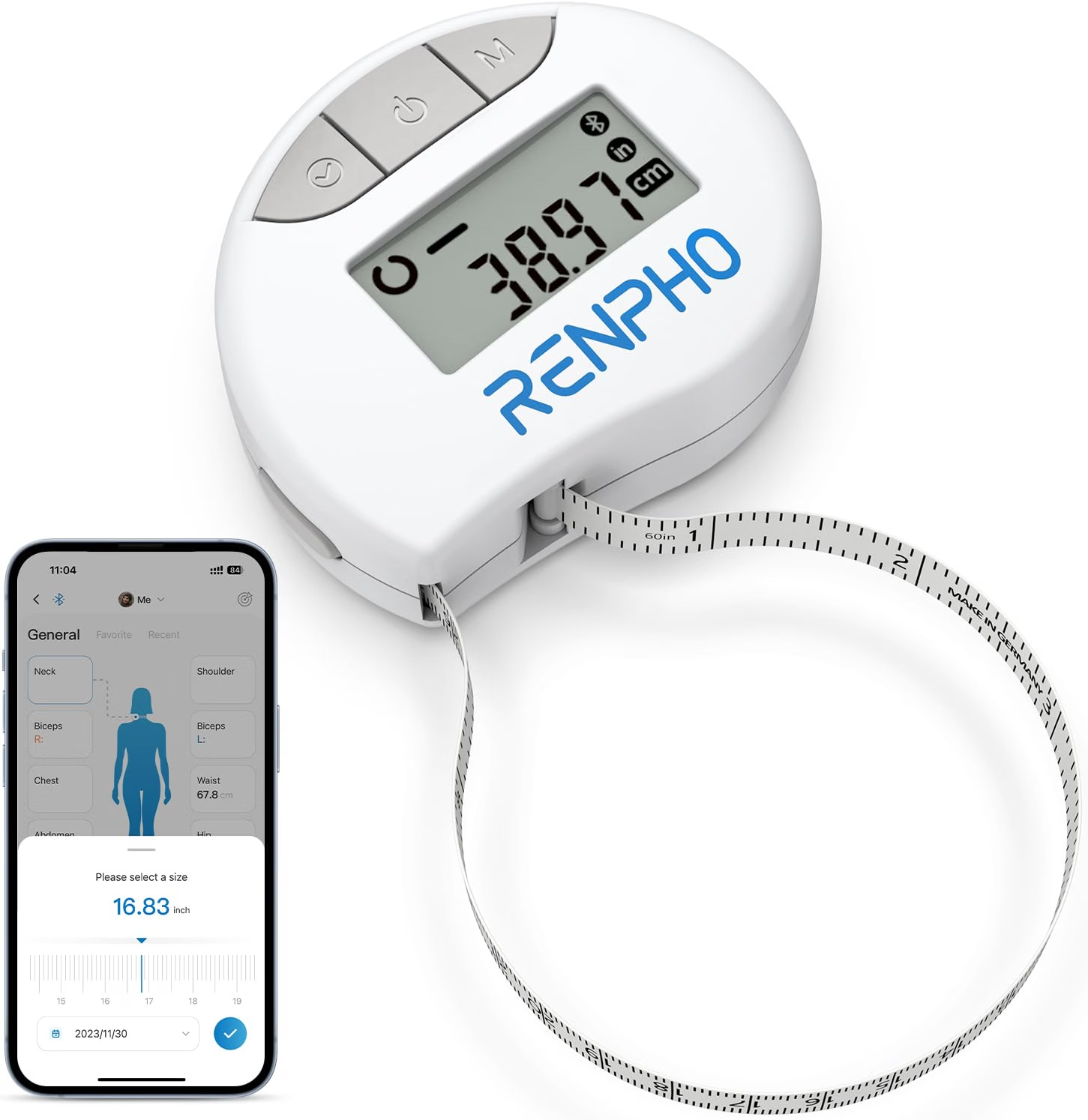
The RENPHO Smart Body Measuring Tape (RF-BMF01) is a retractable Bluetooth tape that measures around your waist, hips, arms, and other areas. The white model has a locking pin, a digital display, and a range of 60 inches (150 cm). You can read the number on the tape or save it in the RENPHO Health app after confirming the measurement.
It makes the most sense if you measure yourself regularly and want a dated record without typing every number. Set it to circumference mode, use the same spot each time, and keep the tape flat and snug without pressing into your skin. A flexible manual tape and a written log can serve the same purpose for occasional checks.
The display helps you read the number while the tape is in place. The app gives you a history to review. Changes in tape placement or tension can still change the result.
PVL editorial rating: 4.0/5. This is a research-based review of the white RF-BMF01, Amazon ASIN B082W886W9. PVL based the rating on the manual, product specifications, and the trade-offs compared with a regular tape. PVL has not performed hands-on testing.
Check price on Amazon Read the verdict
Table of contents
- Specs at a glance
- Setup and app syncing
- Repeatable measurements
- Smart tape vs. manual tape and smart scale
- Who should buy it?
- Frequently asked questions
RENPHO Smart Body Measuring Tape specs at a glance
| Feature | RF-BMF01 |
|---|---|
| Measurement modes | Straight length and circumference |
| Range and units | Up to 60 inches or 150 cm, per RENPHO |
| Display and closure | LCD with a locking pin and retractable tape |
| App and connection | RENPHO Health through Bluetooth |
| Power | One CR2032 coin cell, listed as included |
The RF-BMF01 is the base model. RENPHO also sells a Smart Tape Measure+ under model R-Y002. The two names are similar, so check the model and color when selecting an Amazon variant. The setup steps below are for the RF-BMF01. RENPHO model directory.
How do you set up the RENPHO tape and sync readings?
Start by installing the CR2032 cell according to the manual. You need a small screwdriver for the battery cover. Power on the tape, choose inches or centimeters, and set the measuring mode. Use circumference mode when the pin is docked and the case forms part of the loop. Use straight-length mode when the tape is extended as a line. Choosing the wrong mode can change the displayed number before placement or tension enters the picture.
- Open RENPHO Health. Enable Bluetooth on your phone and open the circumference measurement area. Pull the tape out to activate the connection. RENPHO’s manual says the Bluetooth icon stops flashing when the connection succeeds.
- Choose a body area. Select the area you intend to log, such as waist or hip. Pick the correct date if the app prompts you.
- Make a loop. Wrap the tape flat around the selected area and insert the pin into the housing. Use the adjust button to remove slack gently while you check that the tape is level.
- Confirm and save. Read the number on the display. Use the check button on the tape or the corresponding app control to confirm, then save the entry. Check that it appears under the intended body area.
The first measurement is a good time to learn the controls. Choose one body area, save one entry, and find it in the app history before taking another reading. That makes it easier to identify a pairing issue or a missed save. If the Bluetooth icon keeps flashing, check that Bluetooth is enabled, keep the phone close, and try again from the app’s circumference screen. App menus may change with updates. RF-BMF01 manual · RENPHO Health support.
How can you get repeatable waist and hip measurements?
Decide where you will place the tape and write down that landmark. If you choose to measure around your waist, use the same point on your torso each time. For hips, use the widest part of the hips and buttocks and check that the tape stays horizontal all the way around. A mirror can help you spot a tape that slopes down at the back. Take the reading while standing naturally, with the tape resting flat. For each comparison, use similar clothing and a similar time of day.
Take two readings during your first session to see how consistent your placement is. Remove the tape between readings and reposition it from scratch. If the numbers differ, check the mode, the tape’s height, and how firmly it sits against your body. Once you have a method you can repeat, compare measurements taken under similar conditions over time. A single change can reflect where the loop sat or how much slack you removed.
For example, say your first waist measurement was taken over a T-shirt before breakfast and your next was taken over jeans after dinner. Record those conditions with the readings. At your next check, repeat the first setup so you have a closer comparison. If you also measure your hips, save them as a separate entry. That sounds basic, but the convenience of a quick Bluetooth save makes the label especially easy to overlook.
How accurate is the RENPHO Smart Body Measuring Tape?
There are two questions: whether the tape displays the loop length correctly, and whether you can recreate the same loop around your body. RENPHO gives different numerical accuracy figures in its product listing and online manual. PVL did not verify either tolerance independently. For home tracking, use the device consistently, check that it returns to its expected starting reading, and compare repeated measurements. Fine display increments alone tell you little about how closely two real-world measurements will agree. RENPHO product specifications · Technical data in the manual.
Smart tape vs. manual tape vs. smart scale
| Tool | What it tracks | Who it suits |
|---|---|---|
| RENPHO RF-BMF01 | Length or circumference, with confirmed readings saved to RENPHO Health | Someone measuring solo who wants an app history |
| Flexible manual tape | Length or circumference, logged by hand if desired | Someone who measures occasionally or prefers a paper log |
| RENPHO MorphoScan Nova | Body weight plus impedance-based body composition estimates | Someone mainly interested in body-weight trends or composition estimates |
The upgrade is easiest to justify if writing down measurements is the step you tend to skip. A manual tape remains useful for a quick clothing measurement or a periodic check. If you already log weight with a RENPHO scale, both devices use RENPHO Health, with separate readings for weight and body dimensions. You can also pair any ordinary scale with a manual tape and keep both sets of numbers in a simple log.
Who should buy the RENPHO RF-BMF01?
Consider it if you regularly track two or more body measurements, take them by yourself, and value a dated record in an app. Its best features are the pin that closes the loop and the screen that lets you read the result without finding the overlap on a printed tape. If you measure only when ordering clothes, the extra setup and battery maintenance may outweigh the convenience. A manual tape also suits anyone who wants to keep measurements out of a phone app.
Pros and cons
- Pros include a locking loop for solo use, two units, an on-device display, and Bluetooth logging after confirmation.
- Cons include a replaceable coin cell, a little setup to switch modes and save entries, and technique-dependent readings. The 60-inch reach also limits where the tape fits.
Frequently asked questions
Can you use the RENPHO tape without your phone?
You can read the measurement from the LCD without consulting your phone mid-measurement. If you want to keep a paper log, copy the number and its unit from the screen. For an app history, connect the tape to RENPHO Health and confirm and save the measurement there.
Does it automatically save each body measurement?
Bluetooth sends the reading when you confirm it. The manual also tells you to select the body area and finish by saving it in the app. Check the entry on your first attempt. Otherwise, it is easy to assume that a number on the display is already part of your history.
Does the RENPHO tape measure body fat percentage?
The tape measures a distance or the circumference of a body area. A waist or hip result describes size at that particular measuring point. Body-fat percentage requires a separate estimation method. If you use a smart scale too, keep the scale’s estimates and the tape’s measurements distinct when reviewing them.
What is the maximum length of the RF-BMF01?
RENPHO lists the tape’s reach as 60 inches or 150 cm. If the area you want to measure is close to that limit, check that there is enough usable length to close the loop comfortably before choosing this model. Follow the manual and avoid forcing the tape beyond its stop.
What battery does the RENPHO smart tape use?
The RF-BMF01 takes one CR2032 coin cell, which RENPHO lists in the box. The battery compartment has a screw. Follow the polarity diagram, seat the cover correctly, and tighten it before use. If the screen stays blank, the manual recommends checking or replacing the battery.
Is a Bluetooth measuring tape better than a regular flexible tape?
Choose Bluetooth if a locking loop, digital readout, and app history would make a regular routine easier. For occasional checks, a flexible tape and a written note may be all you need. Both tools depend on using the same body landmark, keeping the tape level, and applying similar tension.
Reviews
There are no reviews yet.