Quick Answer
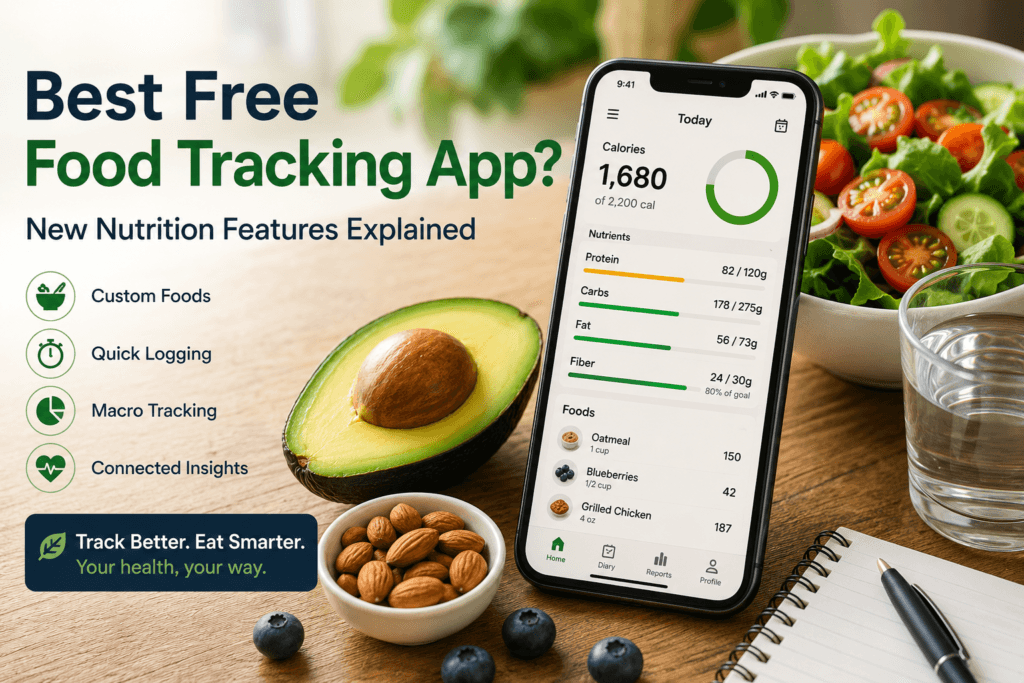
Google Health is a strong free food-tracking option for people who want simple calorie, macronutrient, hydration, activity, and sleep data in one place. Its July 2026 version 5.04 update added reusable custom foods and quick calorie-and-macro logging. A dedicated nutrition app may still be better for detailed micronutrients, while a printable or digital food diary may suit people tracking hunger, digestion, mood, or meal patterns rather than numbers.
Key Takeaways
- Choose a tracker based on your goal: simple logging, detailed nutrients, fiber, hydration, symptoms, or meal patterns.
- Google Health now supports reusable custom foods and faster calorie-and-macro entries.
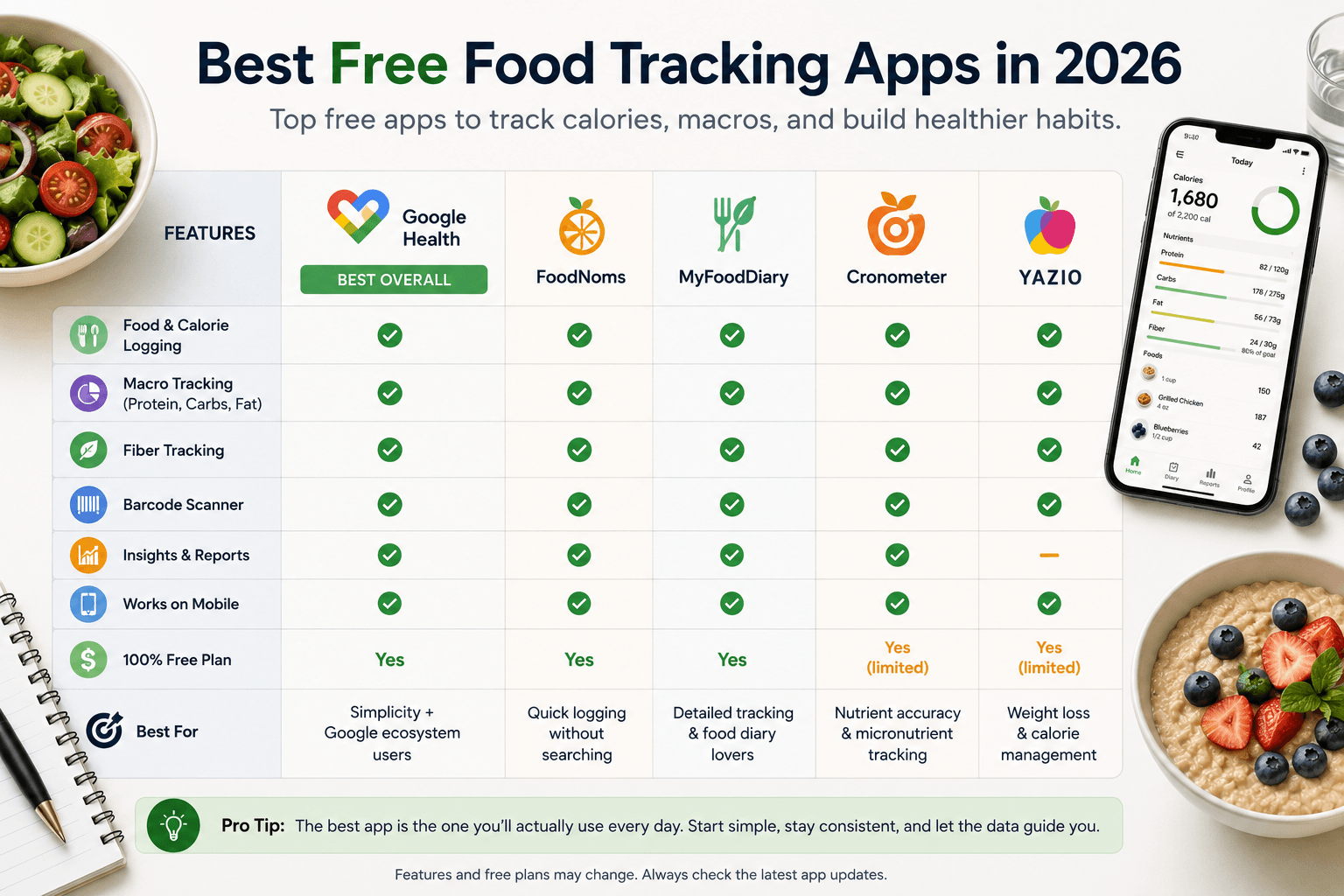
- FoodNoms, MyFoodDiary, and other dedicated apps may offer a different balance of detail and convenience.
- Use food logs to identify patterns; database values, portions, restaurant meals, and calorie-burn estimates are not perfectly precise.
- Short tracking periods can be enough, especially if daily logging increases anxiety or makes eating feel overly rigid.
Table Of Contents
- Google Health Expands Nutrition Tracking in 2026
- What Makes a Good Free Food Tracking App?
- What’s New in Google Health Food Logging?
- Can Google Health Replace a Dedicated Food Diary?
- What About FoodNoms and MyFoodDiary?
- Do You Need a Food Diary Template Instead?
- Should You Track Fiber Too?
- How to Use a Food Tracker Without Becoming Obsessed With Numbers
- Is Google Health the Best Free Food Tracking App?
- Frequently Asked Questions
- Final Thoughts
- Related Reads
- Sources
Google Health Expands Nutrition Tracking in 2026
Food tracking is becoming less about recording every bite in a complicated diary and more about making useful nutrition data easier to capture. Google Health’s July 2026 update is a good example of that shift.
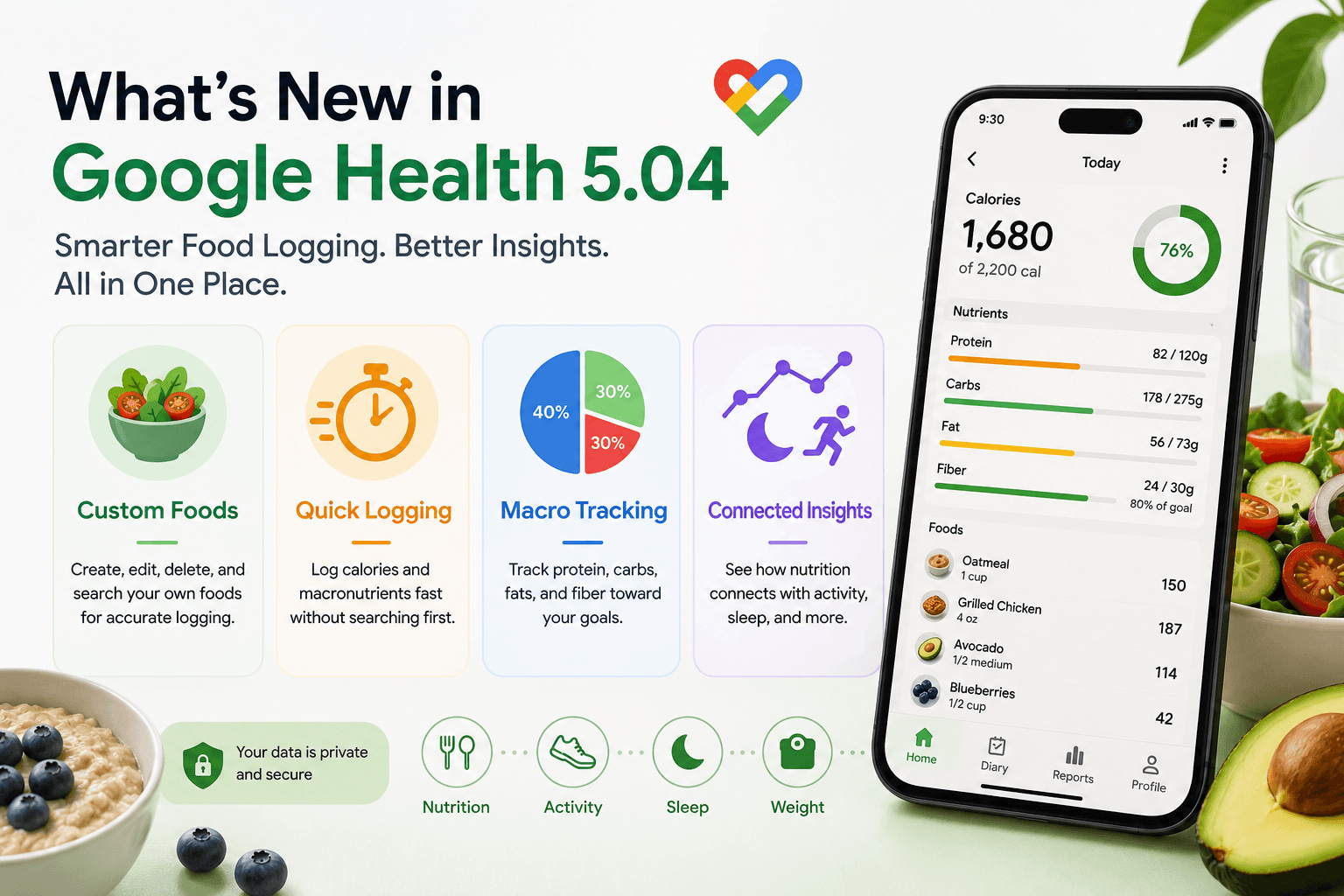
Google announced version 5.04 of the Google Health app with several nutrition-focused changes. Users can now create, edit, delete, search for, and reuse custom foods. The update also introduces quick logging, allowing users to enter calories and estimated macronutrients without first searching for a specific food. Google also says it fixed an issue that caused macronutrient percentages to be calculated incorrectly for some users.
Those changes may sound small, but convenience matters. A food tracker that takes too long to use can become another habit people abandon. Faster logging can make it easier to keep a useful record without turning every meal into a data-entry exercise.
What Makes a Good Free Food Tracking App?
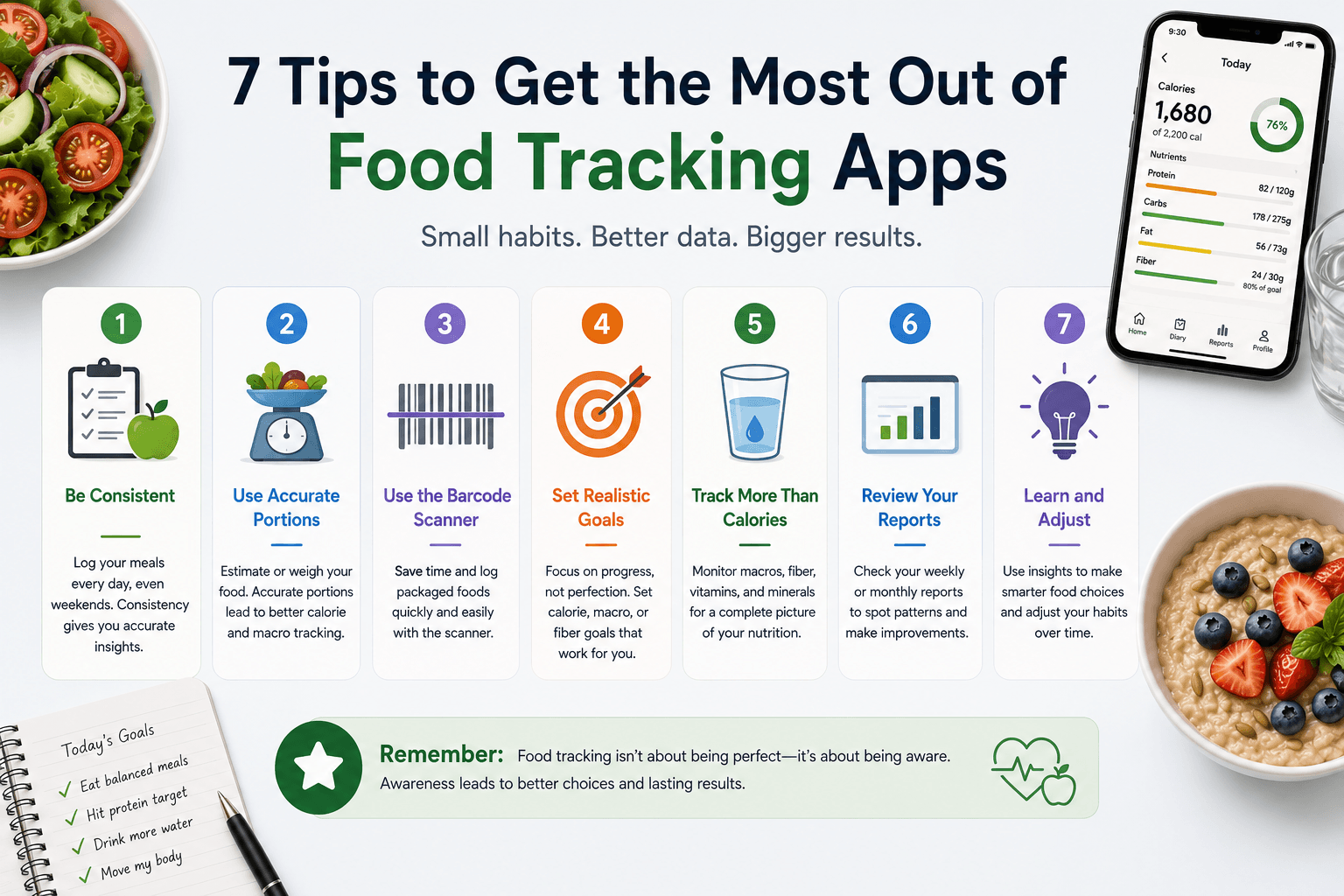
The best free food tracking app is not necessarily the app with the longest feature list. For most people, it is the one they can use consistently while getting enough information to support their goals.
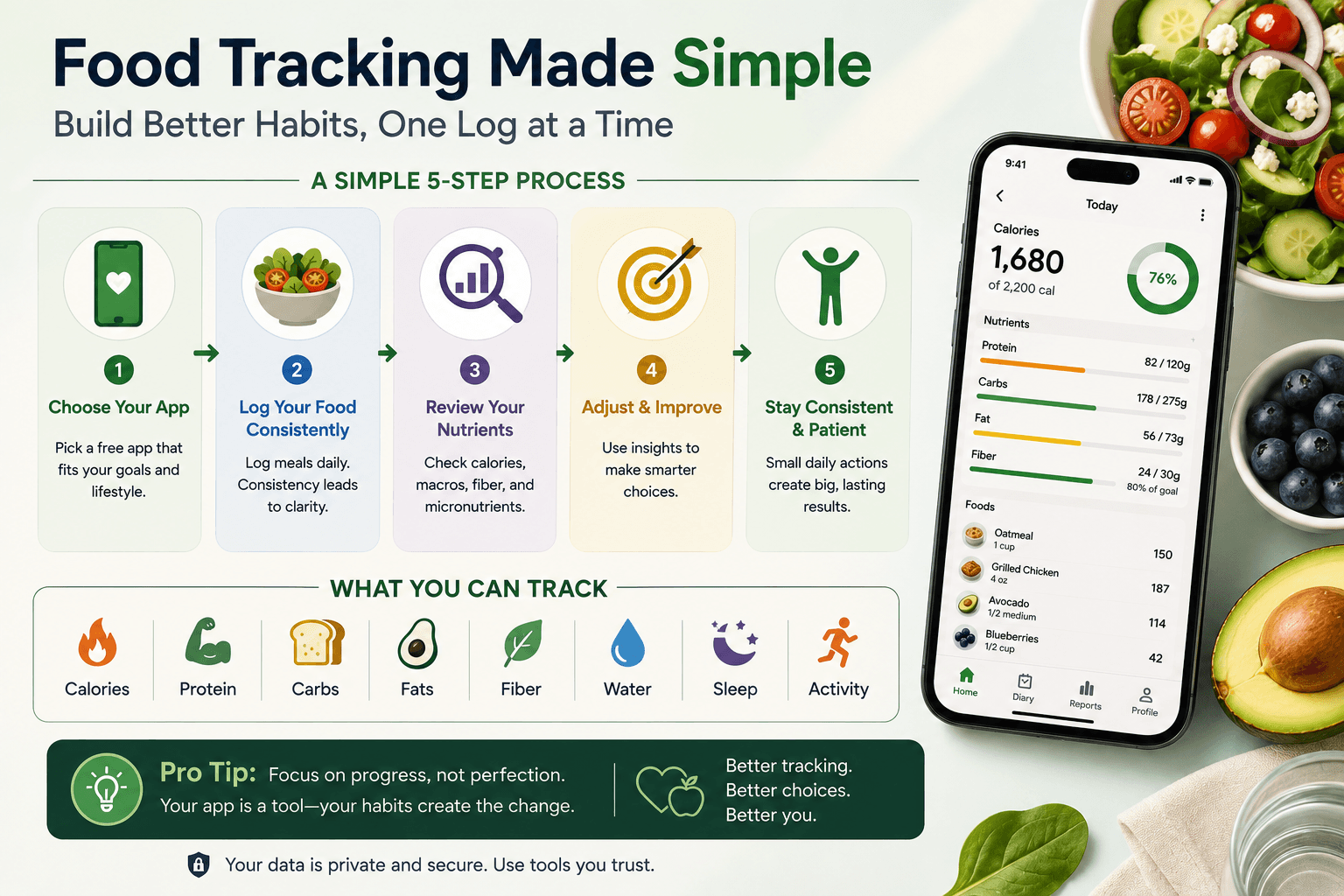
A useful food tracker should make common foods easy to log, allow portions to be adjusted, show calorie and macronutrient information clearly, and make it simple to correct mistakes. Features such as barcode scanning, saved foods, hydration tracking, meal history, and connections with fitness or health platforms can make the experience more practical.
Google Health is increasingly combining these functions with broader wellness data. According to Google’s current help documentation, nutrition data can be viewed alongside exercise, sleep, and other health information. That broader context is important because nutrition does not operate in isolation. What you eat can affect energy, recovery, sleep habits, and how you feel throughout the day.
What’s New in Google Health Food Logging?
1. Create and Reuse Custom Foods
Custom foods are one of the most useful additions for people who regularly eat homemade meals, local foods, specialty products, or foods that are difficult to find in a standard database.
Instead of repeatedly rebuilding the same entry, Google Health now lets users create a custom food and find it again later. You can also edit or delete those custom entries when needed.
This can make food tracking more personal. A database may contain thousands of foods, but your daily meals often come from a much smaller group of foods and recipes. Saving the items you actually eat can reduce friction.
2. Quick Calorie and Macronutrient Logging
Sometimes you know approximately what you ate but do not need a detailed food entry. Google Health now lets you quickly add calories and macronutrient estimates without searching for a food name first.
That can be useful when eating away from home, using nutrition information from a restaurant, or recording a meal whose ingredients are difficult to enter individually.
Quick logging should still be treated as an estimate. Portion sizes, preparation methods, ingredients, and restaurant recipes can change the actual nutrient content. The goal is useful tracking, not false precision.
3. More Emphasis on Macros
Calories remain useful, but many people also want to understand protein, carbohydrates, and fat. Google Health places these macronutrients prominently in its nutrition experience and allows users to adjust their goals.
Protein intake, for example, may be especially relevant for people trying to support muscle maintenance, recovery, or satiety. Carbohydrates and fats also play important roles in a balanced diet. Tracking can help reveal patterns, but the numbers should support healthy eating rather than replace it.
4. Nutrition, Hydration, Fitness, and Sleep in One Place
One advantage of a broader health platform is the ability to view nutrition alongside other behaviors. Google says its Health app can connect food and hydration information with fitness and sleep data.
This is potentially more useful than looking at calories alone. Someone who feels tired every afternoon, for example, might consider meal timing, hydration, sleep quality, activity, and overall eating patterns rather than assuming one nutrient is responsible.
If low energy is your main concern, see our guide on how to get more energy naturally for a broader look at sleep, hydration, movement, nutrition, and daily habits.
Can Google Health Replace a Dedicated Food Diary?
For basic tracking, it may be enough for many users. Google Health supports manual food logging, barcode scanning, custom foods, calorie and macro tracking, hydration, and connected nutrition data. Google’s help documentation also describes conversational logging through text or voice and photo-based logging features.
However, people who want highly detailed micronutrient analysis, recipe management, coaching features, or specialized diet tools may still prefer a dedicated nutrition app.
The better question is not simply which app has the most features. Ask what you actually want to learn from tracking. If your goal is to notice meal patterns and keep a simple record, a streamlined tracker may be ideal. If you need detailed nutrient analysis, a more specialized app may be worth the extra complexity.
What About FoodNoms and MyFoodDiary?
Google Health is not the only option. FoodNoms and MyFoodDiary are examples of dedicated food-tracking services people may encounter when searching for a nutrition tracker. Other established apps also focus specifically on calorie, macro, meal, or nutrient tracking.
Rather than choosing based on brand recognition alone, compare the free features that matter to you: food database quality, ease of logging, barcode support, macro visibility, nutrient detail, integrations, privacy controls, and how much functionality sits behind a paid subscription.
Google Health has an advantage for people who already want their nutrition information connected with a wider health ecosystem. A dedicated food app may have an advantage when nutrition analysis itself is the priority.
Do You Need a Food Diary Template Instead?
Not everyone needs an app. A food diary template, food journal template, or simple food log template can sometimes be more useful, especially if you want to record context that calorie trackers do not capture well.
For example, alongside meals you might record hunger, fullness, energy, mood, sleep quality, digestive comfort, meal timing, or why you chose a particular food. Those observations can reveal patterns that a calorie total cannot.
A printable food journal can also work well for people who dislike entering every meal on a phone. Whether you choose an app, spreadsheet, printable food diary PDF, or notebook, consistency matters more than using the most sophisticated system.

Should You Track Fiber Too?
Fiber deserves attention because a food log focused only on calories and macros can miss an important part of dietary quality. Fiber-rich foods include vegetables, fruits, beans, lentils, whole grains, nuts, and seeds.
A fiber tracker can be useful if you are trying to understand whether your eating pattern regularly includes fiber-rich foods. But increasing fiber quickly can cause digestive discomfort for some people, so gradual changes and adequate hydration may be more comfortable.
If digestive health is one of your goals, food tracking can help you notice patterns, but it should not be used to diagnose food intolerances or gastrointestinal conditions on its own. Our gut microbiome guide explains how fiber, food variety, sleep, stress, and other habits work together.
How to Use a Food Tracker Without Becoming Obsessed With Numbers
Tracking works best when it answers a specific question. You might use it for a week to understand breakfast protein, hydration, meal timing, fiber intake, or afternoon eating patterns. You do not necessarily need to track every nutrient forever.
Use estimates as estimates. Food databases, serving sizes, homemade recipes, restaurant meals, and wearable calorie-burn calculations all contain uncertainty. A food log is a decision-support tool, not a perfect measurement of your metabolism.
It can also help to pay attention to outcomes that are harder to quantify: energy, hunger, digestion, sleep, mood, and whether your eating routine feels sustainable.

Is Google Health the Best Free Food Tracking App?
Google Health is becoming a stronger free option for people who want straightforward nutrition logging connected with broader wellness data. Custom foods and quick calorie and macro logging remove two common sources of friction, while integrations can make it easier to see nutrition alongside activity and sleep.
That does not automatically make it the best choice for everyone. A dedicated nutrition tracker may be better if you want deeper nutrient analysis or specialized food features. A food diary template may be better if your goal is to understand habits and symptoms rather than count nutrients.
The best tool is the one that gives you useful information without making healthy eating unnecessarily complicated.
Frequently Asked Questions
What is the best free food tracking app?
There is no single best app for everyone. Google Health is increasingly useful for basic food, calorie, macro, hydration, activity, and sleep tracking in one ecosystem. Dedicated nutrition apps may be better for users who want deeper food and nutrient analysis.
Can Google Health track calories and macros?
Yes. Google Health supports calorie and macronutrient tracking, and its July 2026 update added a quick-log option for entering calorie and macro estimates without selecting a specific food first.
Can I add custom foods to Google Health?
Yes. Version 5.04 allows users to create, edit, delete, search for, and reuse custom food entries.
Is a food diary template better than an app?
It depends on your goal. Apps are convenient for nutrient calculations and repeated foods, while a food diary template can make it easier to record hunger, mood, energy, digestion, meal timing, and other context.
Should I use a fiber tracker?
A fiber tracker can help you understand whether your diet regularly contains fiber-rich foods. It is more useful as a pattern-finding tool than as a reason to chase a single number without considering overall diet quality and digestive tolerance.
Final Thoughts
Google Health’s latest nutrition features make food logging faster and more flexible. Custom foods address the reality that people repeatedly eat foods that may not exist in a standard database, while quick calorie and macro entries make approximate logging easier when detailed information is unnecessary.
If you are searching for the best free food tracking app, focus on the tool that matches your goal and that you can realistically use. Track enough to learn something useful, then turn those insights into sustainable eating habits rather than treating the log itself as the goal. The tracker should support the balanced eating pattern—not become the goal itself.
Related Reads
- Best Diet for Energy: Foods That Help Prevent Energy Crashes
- 15 High Protein Vegan Snacks to Keep You Full and Energized
- 15 Healthy Spinach Recipes for Every Meal (Easy & Delicious)
- 15 Gut Healthy Recipes to Support Digestion Naturally
- How to Get More Energy Naturally: Complete Guide
- How to Heal Your Gut Microbiome Naturally